


BuildBook
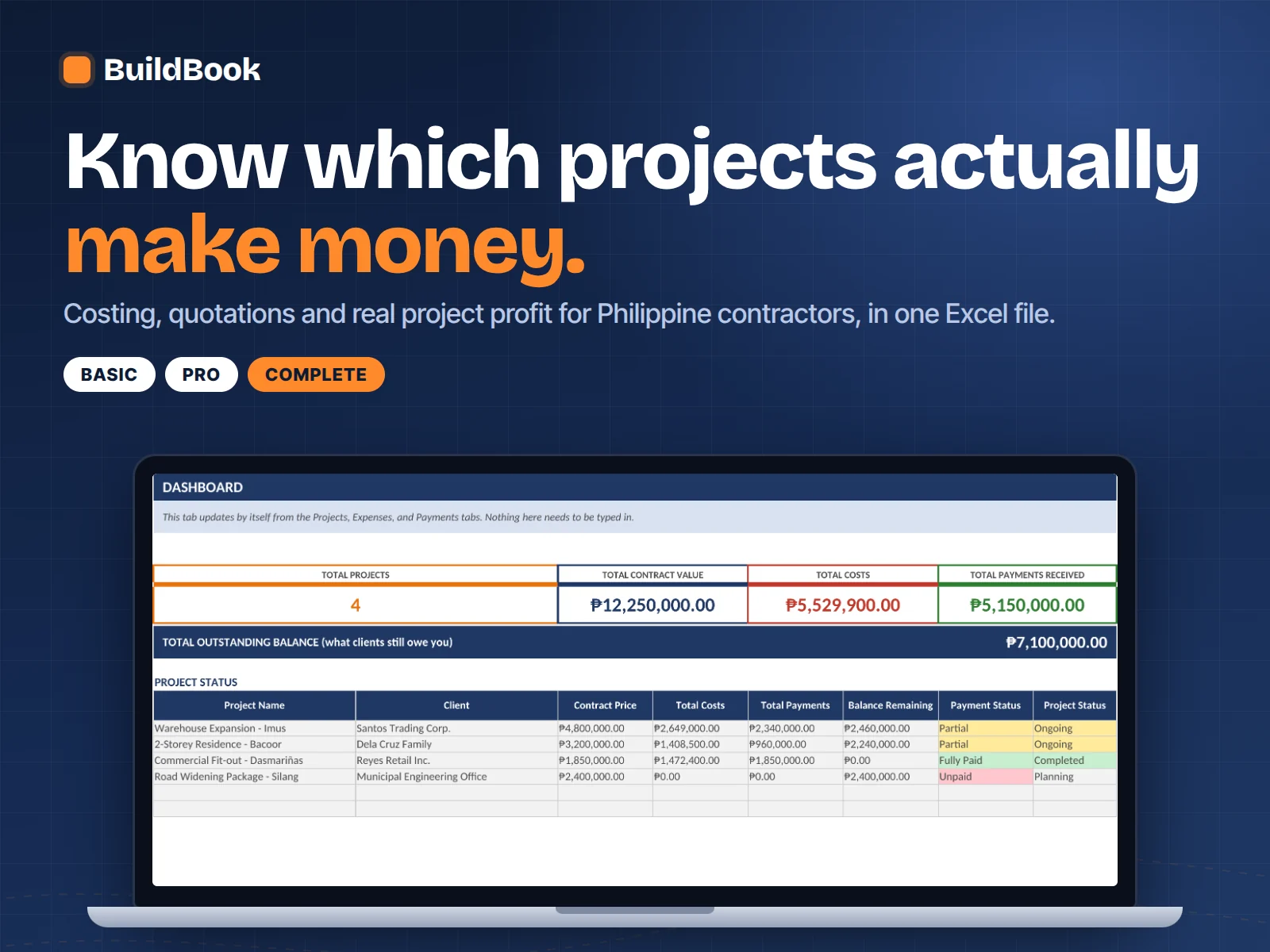
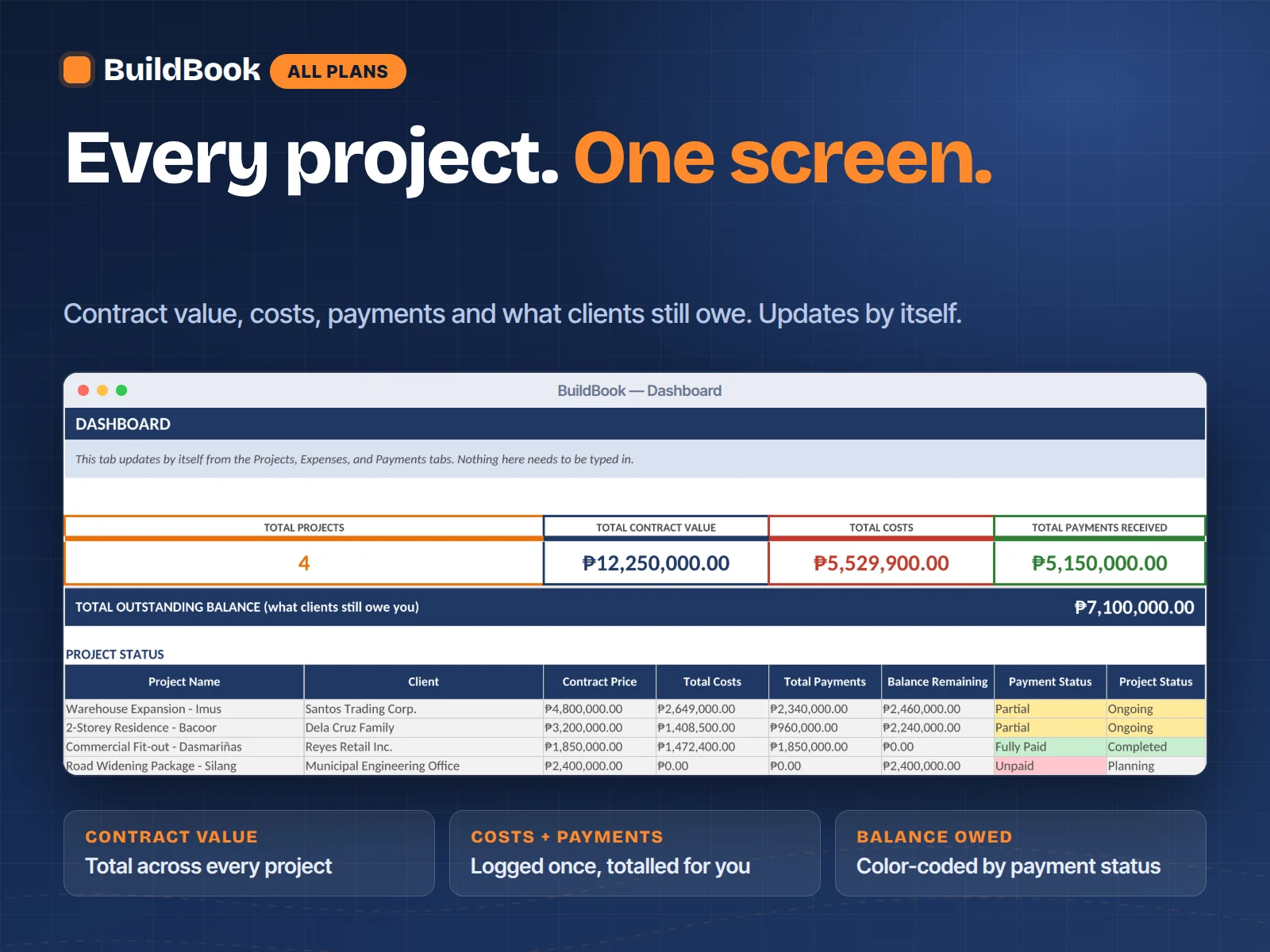
BuildBook Dashboard showing total contract value, total costs, payments received, and outstanding balance across projects
1/3
"Akala ko matagal i-set up, pero mabilis lang pala. Pagkatapos ng unang project, mas malinaw na agad kung tumutubo ako o hindi — hindi na ako naghihintay hanggang matapos ang trabaho."
Roberto G., Marikina✓ Built for contractors

*Sample data shown for illustration. Individual results may vary.

Built for serious contractors

BuildBook — From Guessing Your Markup to Knowing Your Real Profit

Costing + Quotations + Budget Control, in one Excel file

  • Know your real profit margin before you send the quotation
  • Build an estimate once — it flows into billing and budget tracking
  • See every project's cost, payments, and balance in one dashboard
  • Catch a project going over budget before it's too late to fix
  • Works in Excel or Google Sheets — no software to install, no login

---CHOOSE YOUR PLAN---

Included with every plan

3 bonus calculators: Project Cost & Profit, Material Cost, and Labor Cost, so you can sanity-check a job before you even open the full tracker.

QRPh
GCash
Maya
Banks

Secure checkout powered by PayMongo — GCash, Maya, QRPh, cards, and bank transfer.

Secure checkout One-time payment

Try it for 30 days — or get a full refund

Use it on a real project. If it doesn't make your costing, billing, and profit clearer than what you use now, email us for a full refund.

What's in the workbook

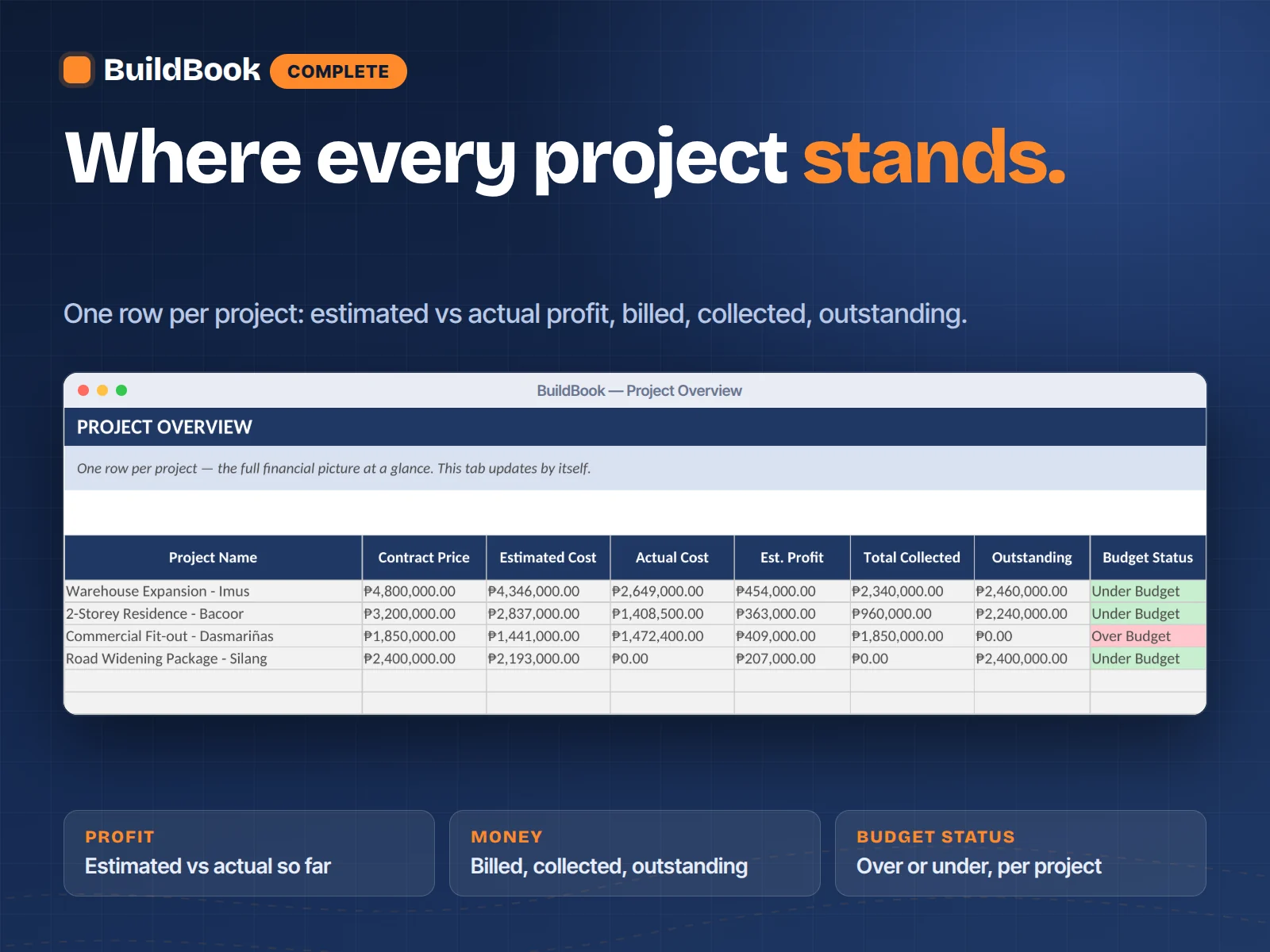
Connected tabs that build on each other: Projects, Costing, Quotation, Materials, Labor, Expenses, Payments, Budget vs Actual, Dashboard, and on Complete, Project Overview, Billing, Change Orders, Cash Flow, and Suppliers. Yellow cells are where you type; gray cells calculate automatically.

How the daily routine works

Add a project, build its cost estimate on Costing, and generate a Quotation. As the job runs, log material purchases and worker costs against that project. Budget vs Actual and the Dashboard update themselves; you never touch a formula.

What the dashboard shows

Total projects, total contract value, total costs, and total payments received, live, with no manual computation. Plus outstanding balance and a per-project status table, color-coded so an unpaid or over-budget job stands out immediately.

How Quotation and Costing work together

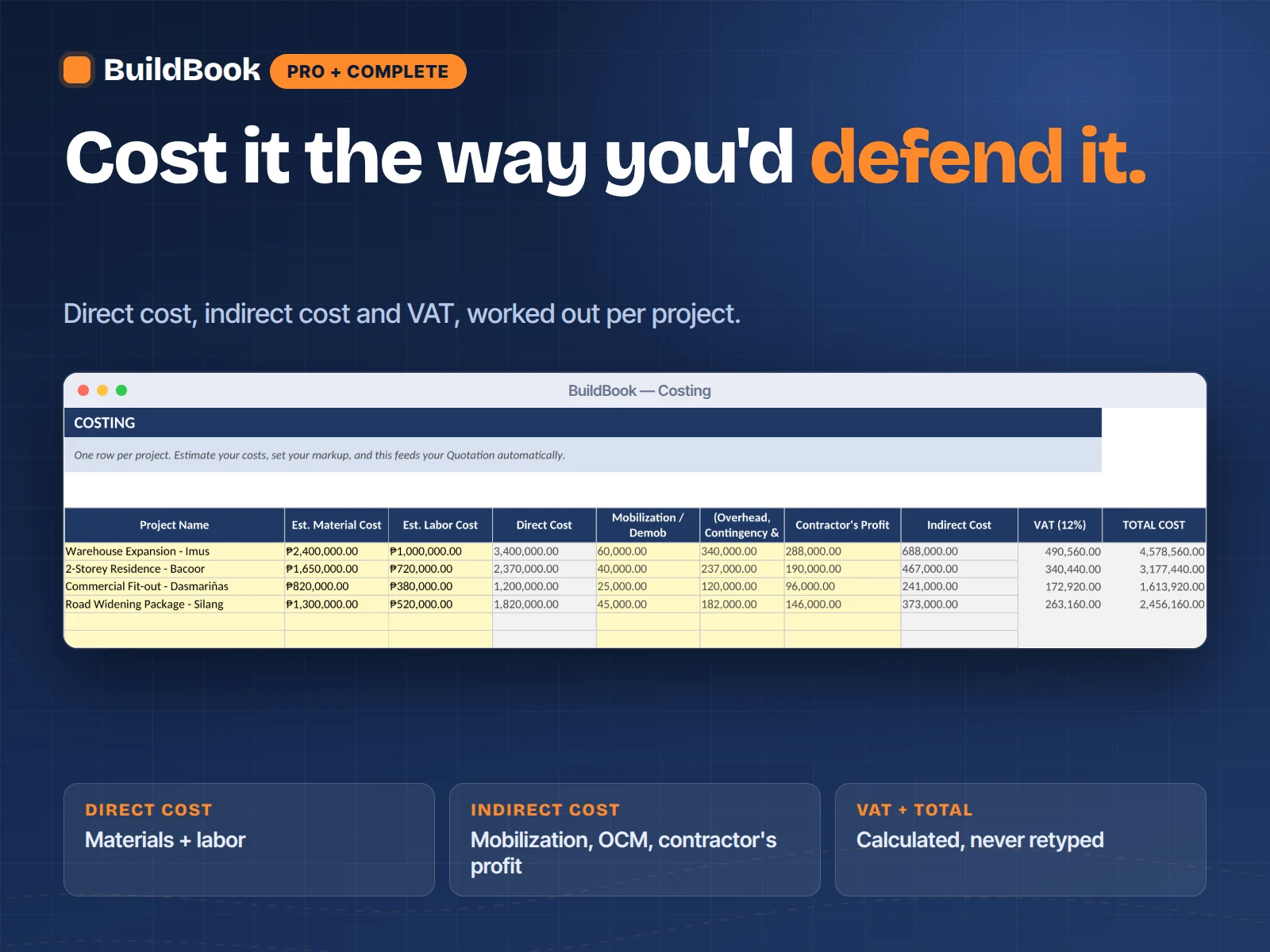
You build the estimate once, on Costing, materials, labor, other costs, and your markup percentage. Quotation then pulls that same data automatically the moment you select a project, so the number you quote is always the number you actually calculated.

Compatibility

Excel 2016 or newer on Windows and Mac, Microsoft 365, and Google Sheets. No macros, no add-ins, nothing that gets blocked by security settings. Formulas and dropdowns work in both apps.

The cost of guessing

You won't know if a project made money until it's already finished.

Most contractors don't lose money because they're bad at the work. They lose it quietly: a markup that felt right but wasn't, a change order the client "forgot" they agreed to, a material cost that ran over and nobody noticed until the job was done and the numbers didn't add up.

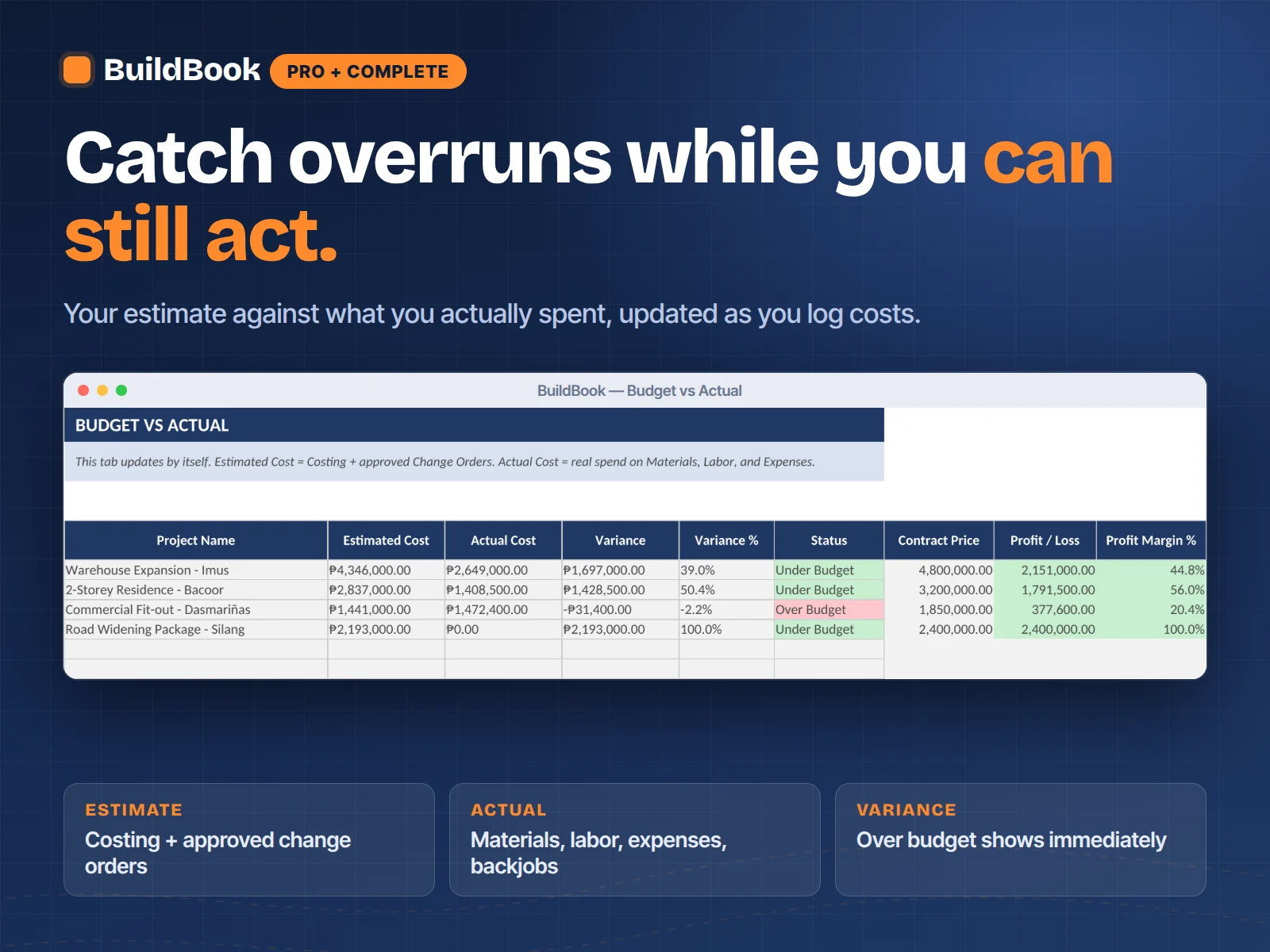
BuildBook gives you the answer before you commit to a price, not after. Build your cost estimate, set your markup, and see your real profit margin before you send the quotation. Log materials and labor as the job runs, and watch actual cost track against your estimate in real time, not at closeout.

No new system to learn. No monthly bill to protect. Just a clear answer to the one question that decides whether a project was worth taking.

Contractor notebook, receipts, calculator, and project papers on a work desk
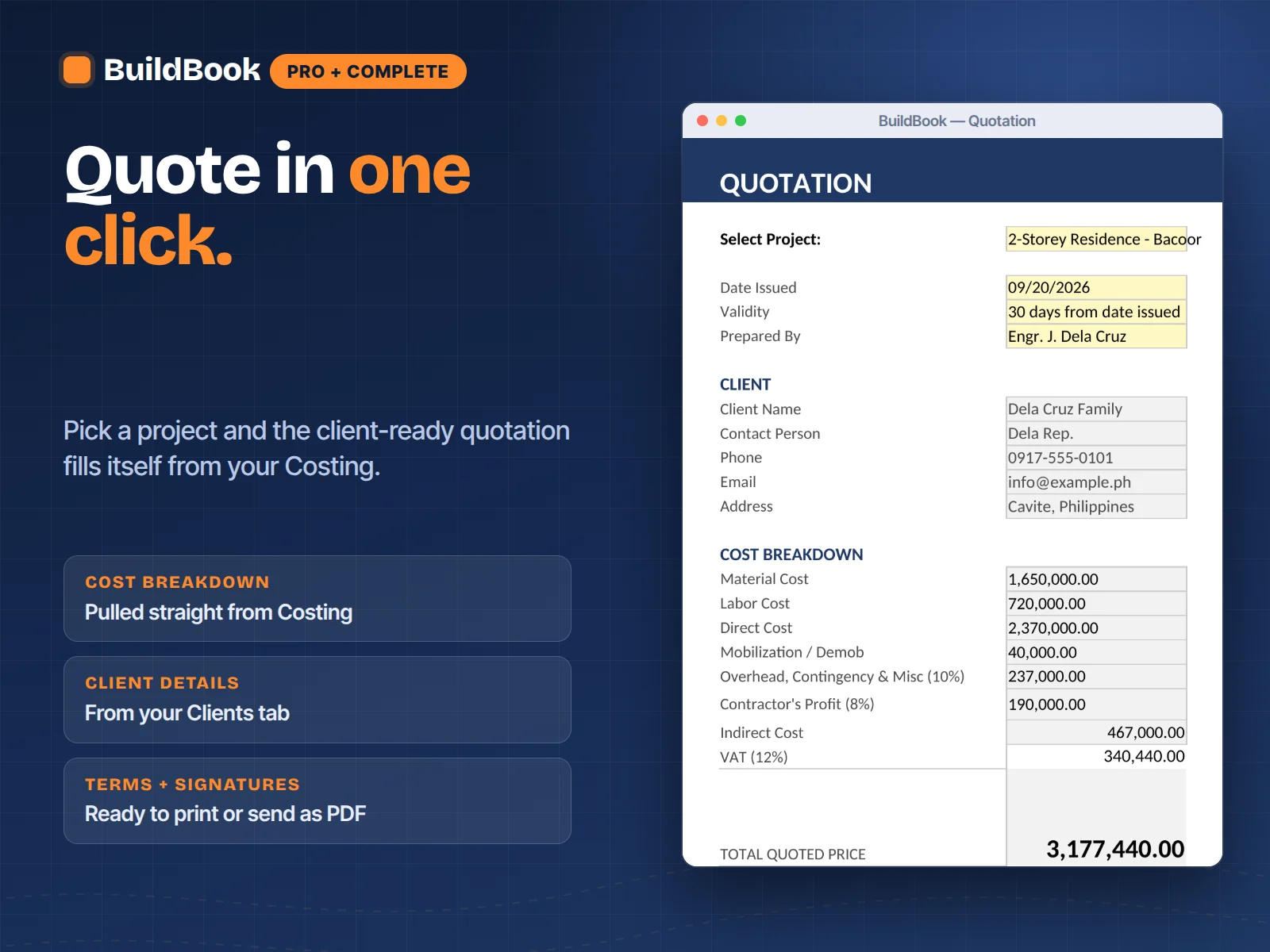
BuildBook Quotation tab generating a client-ready quote automatically

What you get

One file. Every tab connected. No retyping the same number twice.

Build a cost estimate once, and it flows into your quotation, your budget tracking, and your dashboard automatically. Log a material purchase once, and it updates the project's actual cost, the budget comparison, and the supplier's running total, all at the same time.

Costing

Estimate materials, labor, and other costs, then set your markup. See your quoted price and profit before you commit to a number.

Quotation

Pick a project from a dropdown and get a complete, client-ready quotation, pulled straight from your costing. No retyping.

Materials & Labor

Log every purchase and every worker-day against the project it belongs to, so nothing gets buried in a generic expenses list.

Budget vs Actual

Your original estimate, plus any approved change orders, compared to what you actually spent. Updates itself as you log costs.

Dashboard

Every project's contract value, total cost, payments, and outstanding balance, color-coded so problems are visible before they grow.

A clear fit matters

Is BuildBook right for your business?

It's intentionally focused. Here's what it's built to do, and what it's not.

Built for you if…

  • You quote projects from memory, a notebook, or a Word document
  • You want to know your real margin before you send a quotation
  • You've had a client dispute a change order with no paper trail
  • You run multiple projects at once and lose track of who owes what
  • You want materials, labor, and other costs tracked separately
  • You have 1 to 15 active projects and don't need enterprise software
  • You're comfortable typing into Excel or Google Sheets with a short guide

Choose something else if…

  • You need multi-user cloud collaboration or role-based permissions
  • You need integrated accounting, payroll tax filing, or BIR e-invoicing
  • You want a mobile app with no spreadsheet involved at all

If the core version is what you need, start with Basic at ₱599 and use the 30-day refund window to decide with your real project numbers.

Real contractors, real projects

730 customers track their numbers with BuildBook Basic

4.8730 verified reviews
5 star
612
4 star
98
3 star
14
2 star
4
1 star
2

Dun ko lang nalaman kung magkano talaga ang kita ko per project

Dati, tapos lang ang project saka ko malalaman kung tumubo ba ako. Ngayon, gamit ang Costing tab, alam ko na agad bago pa magsimula kung sulit ang presyo. Yung markup ko, na-adjust ko pala nang tama base sa totoong gastos.

Ronnie D.

RD Builders, Cavite

Verified

Jul 4, 2026

Wala nang away sa change orders

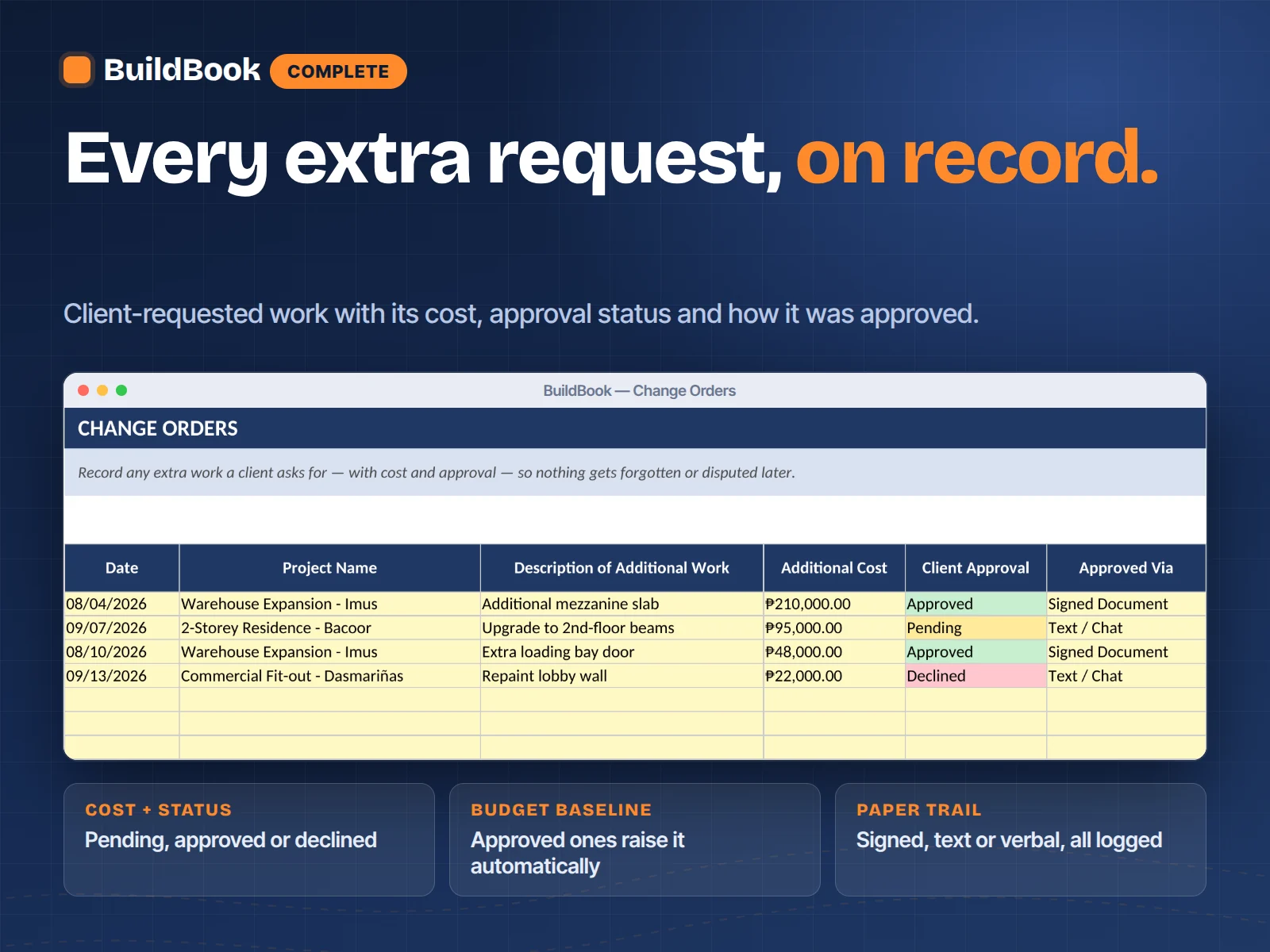
Lagi kaming nagtatalo ng client dati kung sino may sabi ng dagdag na gawa. Ngayon may date, may amount, may approval. Isang tingin lang sa Change Orders tab, tapos na ang usapan.

Dennis R.

QuickBuild Construction

Verified

Jun 29, 2026

Malinaw na kung sino may utang sa akin

Marami akong project sabay-sabay kaya nalilito ako minsan kung sino nakabayad na. Yung Budget vs Actual at Billing tabs, doon ko na lang tinitingnan lahat. Isang project, isang tingin.

Aileen S.

Santos Construction Supply & Builders

Verified

Jun 22, 2026

Mas madali na i-monitor lahat ng project

Yung Project Overview tab, doon ko na lang nakikita lahat, estimated cost, actual, at kung sino may utang sa akin. Hindi na ako nagbubukas ng tatlong file para lang malaman kung anong nangyayari.

Joel M.

Bayanihan Builders, 3 ongoing projects

Verified

Jun 16, 2026

Konting oras lang ang setup, tapos ready na

Inabot ako ng isang gabi para ma-set up yung unang project ko, pero one-time lang naman yun. Hindi ako Excel expert pero nasundan ko yung Cover tab. Sana lang mas maraming built-in na cost reference per region.

Prisha K.

Fresh Start Renovations

Verified

Jun 10, 2026

Mas propesyonal na ang quotation ko

Dati Word document lang gamit ko sa quotation, minsan hindi pa tugma sa totoong costing ko. Ngayon, isang pili ng project sa dropdown, kumpleto na agad ang quotation, kasama presyo, terms, at signature lines.

Carlo B.

CB Construction Services

Verified

Jun 3, 2026

"Malaking difference talaga. Hindi na ako nanghuhula kung tumutubo ako. Sa loob ng dalawang buwan, alam ko na agad kung aling project ang kumikita at alin ang kailangan ayusin. Simula noong ginamit ko yung Costing tab, mas malinaw na ang markup ko sa bawat quote."

Ronnie D.

RD Builders, Cavite

15 min
Average time to build a client quotation, reported by users
91%
Say they found a project cost they weren't tracking
₱0/mo
One-time price, no subscription, ever
30 days
Full refund window, files stay yours

A practical starting point

From guessing your markup to knowing your real profit.

  1. 1

    Day 1

    Open the file and add your first project on the Projects tab. Build your cost estimate on Costing, set your markup, and generate a quotation for the client the same day.

  2. 2

    Week 1

    Log material purchases and worker costs as the job runs. Budget vs Actual updates itself, so you can see the moment a project starts drifting from your estimate instead of finding out at the end.

  3. 3

    Month 1

    Open the Dashboard and see every active project's contract value, cost, and outstanding balance in one screen. No more opening three files to answer one question about where the money went.

  4. 4

    Project 3+

    Your quotations get more accurate because your estimates are grounded in real numbers from past jobs, not gut feel. Change orders get logged the moment a client asks, so there's never an argument about who agreed to what.

The simple promise

Clarity without another monthly bill.

₱599–₱3,499 once
No monthly fee
No login needed
Excel + Sheets
Formula-protected
30-day refund

Compare plans

Choose the system that matches how you run your projects.

Every plan is a one-time purchase. Upgrade when you need deeper control over costing, billing, and cash.

What's included

Basic

₱599

Pro

Most Popular

₱1,499

Complete 18-in-1 System

Best Value

₱3,499

Project, expense & payment tracking
Auto-updating dashboard
Costing + markup, per project
One-click client quotation
Dedicated Materials & Labor logs
Budget vs Actual tracking
Project Overview (all projects, one row each)
Billing schedule + Change Orders
Daily Cash Flow tracker
Supplier contacts + auto purchase totals
3 bonus calculators

Optional add-on: Lifetime Updates + Priority Support, ₱99 once.

The next quotation deserves a real number

Stop finding out if a project was profitable after it's already done.

Build your first cost estimate tonight, send a quotation tomorrow, and know exactly where every project stands from day one. One payment, the file is yours permanently.

Construction contractor reviewing BuildBook on a laptop at a planning desk

Still deciding?

The questions contractors ask before they buy.

Is this for a small contractor like me, or only big firms?

It's built for solo contractors and small crews running 1 to 15 projects at a time, residential builds, renovations, and small commercial work. If you're currently quoting jobs from memory or a notebook, this is built for exactly that gap.

Do I need to be good at Excel?

No. If you can type into a cell, you can start. Yellow cells are where you type. Gray cells calculate automatically and are locked, so a wrong tap doesn't break a formula. The Cover and README tabs walk you through where to start.

What are the three plans?

Basic (₱599) covers project, expense, and payment tracking with an auto-updating dashboard. Pro (₱1,499) adds Costing, one-click Quotations, dedicated Materials and Labor logs, and Budget vs Actual. Complete (₱3,499) adds Project Overview, a Billing schedule, Change Orders, daily Cash Flow, and Supplier tracking, everything you need to run multiple projects at once. Every plan is a one-time purchase, no monthly fee, no login required.

How does the Quotation tab actually work?

You build your cost estimate once on the Costing tab, materials, labor, other costs, and your markup. Then on Quotation, you pick that project from a dropdown and the entire client-facing document fills in automatically: client details, cost breakdown, total price, terms, and signature lines.

Does it work in Google Sheets?

Yes. You receive an .xlsx file that works with Excel 2016 or newer, Microsoft 365, and Google Sheets. There are no macros or add-ins to install.

Is it safe to pay online?

Yes. Payments are processed by PayMongo, a BSP-licensed payment gateway used by thousands of Filipino businesses. Your card, GCash, or bank details are entered directly into PayMongo's checkout page and never touch our servers.

Is it a replacement for an accountant or a full ERP system?

No. It's a practical costing and project-tracking tool, not a tax filing service or enterprise construction-management platform. It helps you organize your own numbers so you can quote with confidence and catch budget problems early.

How do I get the file after payment?

You'll be redirected to PayMongo's secure checkout. Once payment is confirmed, your download link is emailed automatically, usually within a few minutes, and is also shown right on the confirmation page.

What if it's not right for my business?

Use it for 30 days. If it doesn't make your costing, billing, and profit clearer than what you use now, email us for a full refund under the Refund Policy.

One-time purchase · 30-day money-back guarantee

₱1,999₱1,499